MVC
2023. 9. 12. 19:37ㆍjava

M : 필드, 생성자, get/set , to String <-- Data 담당 - VO,DB연동
V : main을 집어 넣으며 모든 실행은 view에서 끝낸다. <-- UI 담당 - 입출력
C : M과 V에 한것을 대입하는것으로 <-- 알고리즘,로직 - for,if,search

void를 쓰게되면 Show로 클래스이름을 바꿀수 있지만
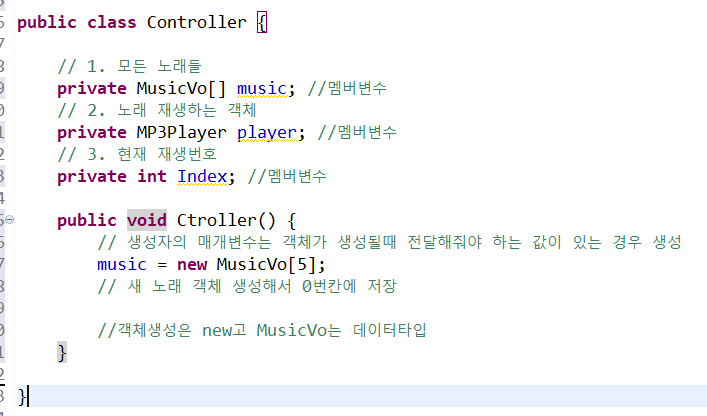

void를 쓰지 않는다면 위의 클래스인 Controller를 이어가야 한다.
package Control;

import Model.MusicVo;
import javazoom.jl.player.MP3Player;

public class Controller {

	// 1. 모든 노래들
	private MusicVo[] music; //멤버변수
	// 2. 노래 재생하는 객체
	private MP3Player player; //멤버변수
	// 3. 현재 재생번호
	private int Index; //멤버변수

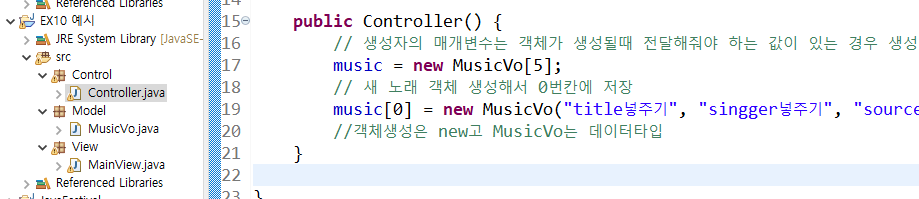
	public Controller() {
		// 생성자의 매개변수는 객체가 생성될때 전달해줘야 하는 값이 있는 경우 생성
		music = new MusicVo[5];
		// 새 노래 객체 생성해서 0번칸에 저장
		music[0] = new MusicVo("title넣주기", "singger넣주기", "source넣주기", Index);
		//객체생성은 new고 MusicVo는 데이터타입

        player = new MP3Player(); //생성자 초기화
		currentIndex=0;
	}
}

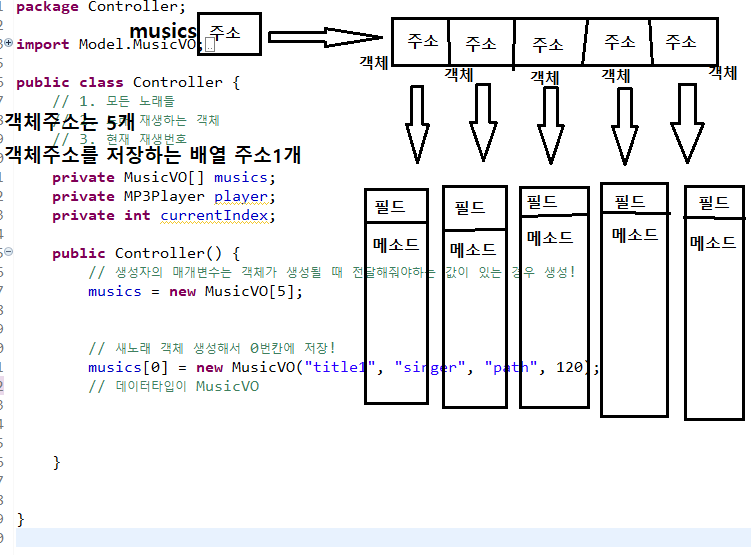
Controller에 syso인 출력 메소드를 넣어버리면 console에만 나타나게 된다.
그러니까 Controller가 아닌 main view에서만 넣어야 실행 하면 나타나게 된다!!
예시)
Controller에 있는 부분으로 <- if문 혹은 삼항 연산자로 쓴다.
index = (index == musics.length-1) ? 0 : index+1; <-- 삼항 연산자
if (currentIndex == musics.length-1) { <-- if문
currentIndex = 0;
}else {
currentIndex++;
}
index = index == 0 ? musics.length-1 : index-1;
if (index == 0) {
index = musics.length-1;
}else {
index--;
}
package Controller;

import Model.MusicVO;
import javazoom.jl.player.MP3Player;

public class Controller {
	// 1. 모든 노래들
	// 2. 노래 재생하는 객체
	// 3. 현재 재생번호
	private MusicVO[] musics;
	private MP3Player player;
	private int index;

	public Controller() {
		// 생성자의 매개변수는 객체가 생성될 때 전달해줘야하는 값이 있는 경우 생성!
		musics = new MusicVO[5];

		// 새 노래 객체 생성해서 0번칸에 저장!
		musics[0] = new MusicVO("Ditto", "뉴진스", "C:\\Users\\SMHRD\\Desktop\\Music\\뉴진스_Ditto.mp3", 80);
		musics[1] = new MusicVO("Seven", "정국", "C:\\Users\\SMHRD\\Desktop\\Music\\정국_Seven.mp3", 80);

		player = new MP3Player();
		index = 0;
	}// 생성자 끝

	public void play() {
		// 현재 재생중인지 검사
		if (player.isPlaying()) { // 현재 노래재생중이면
			player.stop(); // 중지
		}
		// currentIndex 번째 노래 경로 play안에 적어주세요!
		player.play(musics[index].getPath());
	}// play 메소드 끝
	public void next() {
		// 마지막 곡이면 처음곡으로 돌리기
		index = (index == musics.length-1) ? 0 : index+1;
//		if (currentIndex == musics.length-1) {
//			currentIndex = 0;
//		}else {
//			currentIndex++;
//		}
		play();
	}
	public void pre() {
		index = index == 0 ? musics.length-1 : index-1;
//		if (index == 0) {
//			index = musics.length-1;
//		}else {
//			index--;
//		}
		play();
	}
	public void nowPlay() {
		System.out.println(musics[index].toString());
	}
}// 클래스 끝
package View;

import java.util.Scanner;

import Controller.Controller;

public class MainView {

	public static void main(String[] args) {
		// View의 역할 : 사용자 인터페이스(UI), 기능을 사용자가 선택하도록 만들기!

		Scanner scan = new Scanner(System.in);
		Controller con = new Controller();

		while(true) {
			System.out.println("[1]재생 [2]이전곡 [3]다음곡 [4]정보입력");
			System.out.print(">> ");
			int choice = scan.nextInt();

			if (choice == 1) {
				// 맨 처음에는 첫번째 곡 재생
				con.play();
				// 현재 재생중인 곡 정보 받아와서 출력

			}else if (choice == 2) {
				con.pre();
			}else if (choice == 3) {
				con.next();
			}else if (choice == 4) {
				con.nowPlay();
			}else {
				System.out.println("잘못선택하셨습니다.");
				break; <-- 음악은 안멈추고 반복만 멈춘다 ..
			}
		} // while 끝

	}// main 끝

}// class 끝
package Model;

public class MusicVO {
	// 제목(String), 가수(String), 경로(String), 재생시간 (int)
	// 1. 필드
	// 2. 생성자 (모든 필드 초기화)
	// 3. get/set
	// 4. toString
	private String title;
	private String singer;
	private String path;
	private int playTime;

	public MusicVO(String title, String singer, String path, int playTime) {
		this.title = title;
		this.singer = singer;
		this.path = path;
		this.playTime = playTime;
	}

	public String getTitle() {
		return title;
	}

	public String getSinger() {
		return singer;
	}

	public String getPath() {
		return path;
	}

	public int getPlayTime() {
		return playTime;
	}

	@Override
	public String toString() {
		return "title : " + title + "\t singer : " + singer + "\t playTime :" + playTime;
	}
}